August 2026 Product Roundup
A big month across StudySpaces. Here's a roundup of everything new from August — better ways to plan your students' work, meet them wherever they test, and keep them moving. Here's what shipped.
Act as Student — see exactly what your students see
Step into any student's account with one click. From a student's profile, click Act as Student to see precisely what they see and do what they can do — their assignments, their study sessions, their results. It's the fastest way to troubleshoot "I can't find my homework," onboard a new student, or confirm an assignment looks right before they ever open it. Every session is secure and fully audited.

Per-Student Accommodations
Set a student's extra time once, and every timed activity respects it. Choose None, 1.25×, 1.5×, or 2× right on a student's profile, and it automatically applies to their mock exams and timed quizzes. Need an exception for one test? Override it on that assignment. No more rebuilding a test just to honor an accommodation.

Reflections
Turn every practice question into a coaching signal. Right after answering, students can jot a quick note on what tripped them up, in their own words. It saves on that question and shows up in their results — and you see it too, so you understand how they were thinking, not just whether they got it right.

A redesigned Schedule & Programs
Planning your students' work just got a lot clearer. A new month and week calendar shows everything at a glance, a grouped activity sidebar keeps assignments organized, and a unit-based Program tab lets you lay out a full curriculum. The refreshed Student Overview adds a Study Time calendar and a cleaner summary of each student's engagement and progress. You can even name program weeks per student or cohort.

Automatic student re-engagement
Keep quiet students moving without chasing them. Newly invited students who haven't logged in now get an automatic nudge after 7 days, a new Pending tab shows exactly who hasn't started yet, and you can send login reminders on demand to anyone. Students stay in control with a one-click opt-out for daily practice reminders.

SHSAT prep, built in
Prepping students for New York's specialized high schools? SHSAT is now a first-class exam. It joins SAT, ACT, SSAT, and ISEE with the same familiar test experience — two sections (English Language Arts and Math), authentic rights-only scoring, and scaled scores up to a 720 composite. Build and assign SHSAT practice natively, no workarounds.

Quick tasks: StudyBites & To-Do
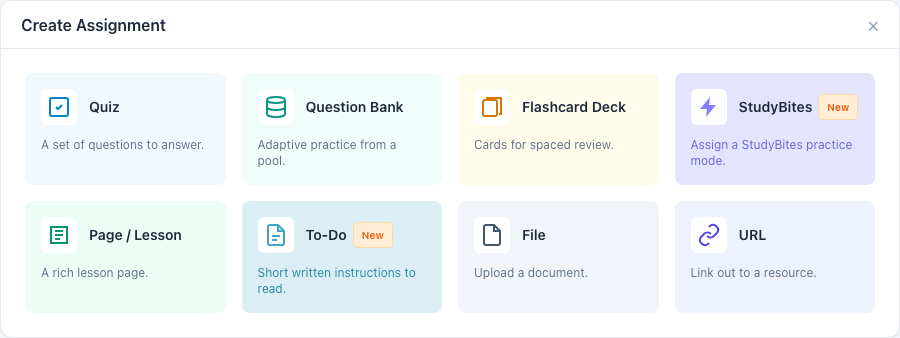
Assign practice or a quick note without building a full activity. Two new lightweight task types you can drop onto a student's plan in seconds: StudyBites for bite-sized practice, and To-Do for short written instructions to read. Less setup, faster assigning — for when all you need is a focused nudge.

Workspace task defaults
Set your preferences once; every new task starts that way. Define default settings for new tasks at the workspace level so assignments come out configured the way your team wants them — consistent across every tutor, with less repetitive setup.

That's August. Jump into your workspace to try them out.